
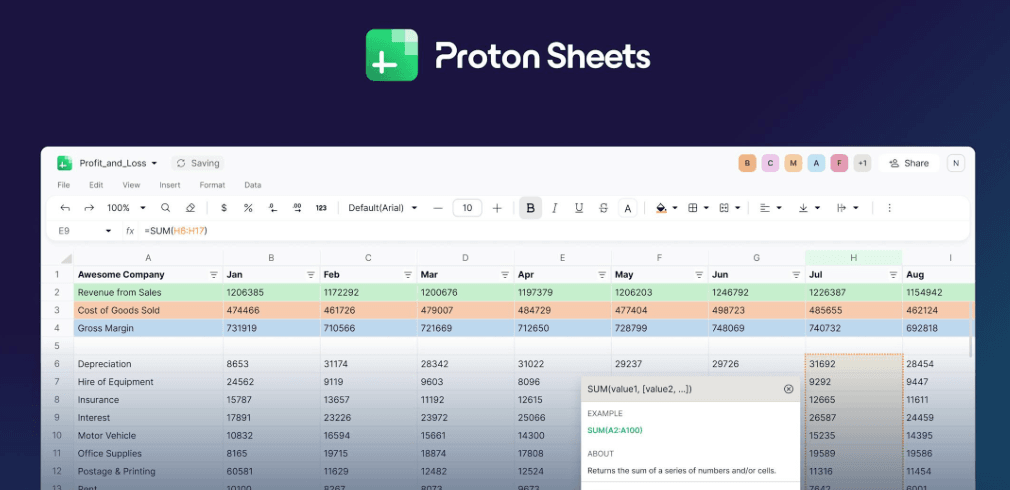
We finally have a spreadsheet tool that doesn’t read your financial projections to train an AI.
The era of “free” software usually comes with a hidden price tag: your data. For years, we’ve casually dumped our financial records, employee salaries, and strategic roadmaps into cloud-based spreadsheets, implicitly trusting that the “lock” icon on the browser meant we were safe.
But as 2025 creates a massive push for AI integration, that trust is fraying. Tech giants are increasingly transparent about using customer data to train their Large Language Models (LLMs). If you are a business owner, a journalist protecting sources, or just someone who values privacy, the idea of your quarterly budget helping a chatbot learn math is… unsettling.
Enter Proton Sheets.
Launched this week by the Swiss privacy fortress Proton (the team behind Proton Mail and VPN), this is the tool many of us have been waiting for. It’s the final piece of the puzzle in a fully encrypted productivity suite.
But is it actually good enough to replace the Google Sheets or Excel tabs you have open right now? Let’s dive in.
The “Big Tech” Problem We Ignored
Before we talk about features, we have to talk about why this product exists.
For the last decade, we’ve traded privacy for convenience. Google Sheets is incredible—it’s collaborative, fast, and free. But Google, Microsoft, and others are fundamentally advertising and data companies. With the rise of generative AI, their hunger for data has grown exponentially.
When you use standard cloud tools, the service provider holds the encryption keys. They can see your data if they want to (or if a government subpoena forces them to). More importantly, automated systems often scan this content to “improve services.”
Proton’s pitch is simple but radical: Data Sovereignty.
They claim that with Proton Sheets, even they cannot see what you are typing. If their servers were seized tomorrow, your financial models would look like gibberish code to the intruders. For industries like healthcare, legal, and finance, this isn’t just a “nice to have”—it’s becoming a requirement.
What is Proton Sheets?
Proton Sheets is a web-based spreadsheet application that lives inside your Proton Drive account. If you’re familiar with the ecosystem, you know the drill: standard productivity tools, but wrapped in military-grade encryption.
The Key Features at Launch:
- End-to-End Encryption (E2EE): This is the headliner. Everything is encrypted on your device before it reaches Proton’s servers. This includes not just the data in the cells, but the metadata too—like file names and thumbnail previews.
- Real-Time Collaboration: This was the biggest hurdle for encrypted apps. Historically, encryption made live collaboration impossible because the server couldn’t “merge” changes it couldn’t see. Proton has solved this. You can invite team members and edit the same sheet simultaneously, securely.
- Formula Support: It launches with support for the most common formulas. It’s not going to run your complex Visual Basic macros (yet), but for SUM, AVERAGE, VLOOKUP, and standard crunching, it works.
- Data Visualization: You can turn that data into charts and graphs directly within the app.
- Free Access: If you have a Proton Drive account (even a free one), you have Sheets.
The User Experience: Does it Feel “Swiss”?
Swiss design is often associated with minimalism and functionality, and Proton Sheets follows suit.
When you open it, you aren’t bombarded with AI suggestions, pop-ups, or sidebar ads. It looks clean. It looks… like a spreadsheet. And that’s a compliment.
The transition for a Google Sheets user is surprisingly low-friction. The grid is where you expect it, the formula bar is familiar, and the sharing settings are intuitive. You can import .csv and .xlsx files directly.
However, the “magic” happens in the background. When you hit that share button, you aren’t just sending a link; you are generating a cryptographic key exchange. The person on the other end needs the right permissions to decrypt that data in their browser. It sounds heavy, but in practice, it feels just like sharing a Google Doc.
The Trade-Off: Security vs. Superpowers
Let’s be real for a second. If you are a financial analyst who spends 8 hours a day building 50-tab Excel workbooks with connected SQL databases and Python scripts running in the background, Proton Sheets is not for you. Not yet.
Encryption imposes limits. Because the server can’t see the data, it can’t easily perform server-side computations.
- No API Integrations (Yet): You can’t use Zapier to automatically pipe data from your CRM into a Proton Sheet.
- No AI “Help”: There is no “Gemini” or “Copilot” sidebar analyzing your trends. For many of us, this is a feature, not a bug. But if you rely on AI to write your formulas, you’re on your own here.
- Performance on Massive Sheets: Browser-based encryption is heavy on your local CPU. Extremely large datasets might feel sluggish compared to Google’s server-side rendering.
Proton Sheets is designed for the 90% of use cases: budgets, project tracking, contact lists, and standard business logic. It’s not trying to kill Excel; it’s trying to kill the surveillance of Excel.
Why This Launch Matters Now
The timing of this launch is strategic. Trust in big tech is at an all-time low. We’ve seen backlash against terms of service updates from Adobe, Slack, and others regarding AI training.
Proton is capitalizing on this “privacy flight.” By adding Sheets, they have effectively closed the loop on the “Workspace” alternative.
- Email? Proton Mail.
- Storage? Proton Drive.
- Writing? Proton Docs.
- Passwords? Proton Pass.
- Numbers? Proton Sheets.
For a small business or a startup, this is now a viable, complete ecosystem. You no longer have to “cheat” on your privacy values by using Google Sheets because there was no alternative. The excuse is gone.
Who Should Switch Immediately?
I’ve been testing privacy tools for years, and usually, I hesitate to recommend them to general users because the UX is clunky. Proton is the exception.
You should consider moving your data to Proton Sheets if:
- You handle sensitive client data: If you are a therapist, lawyer, or consultant, keeping client lists on unencrypted cloud servers is a liability.
- You work in innovation: If your R&D roadmap is on a spreadsheet, do you really want that data sitting on a server owned by a competitor?
- You are privacy-conscious: Even for personal budgeting—why should an ad-tech company know how much you spend on groceries or your mortgage interest rate?
Final Verdict: The “Good Enough” Revolution
Proton Sheets doesn’t need to be better than Excel. It just needs to be good enough to do the job while offering the one thing Microsoft and Google can’t: Zero-Knowledge Privacy.
It feels like a mature step for the encrypted web. We are moving past the days where “secure” meant “hard to use.” Proton Sheets is slick, fast, and accessible.
If you’ve been looking for a sign to de-Google your life or your business, this is it. The handcuffs are off.
Ready to reclaim your data? Go log in to your Proton Drive. The ‘Sheets’ icon is waiting there. Try importing just one sensitive spreadsheet today—maybe your monthly budget—and see how it feels to own your data again.