
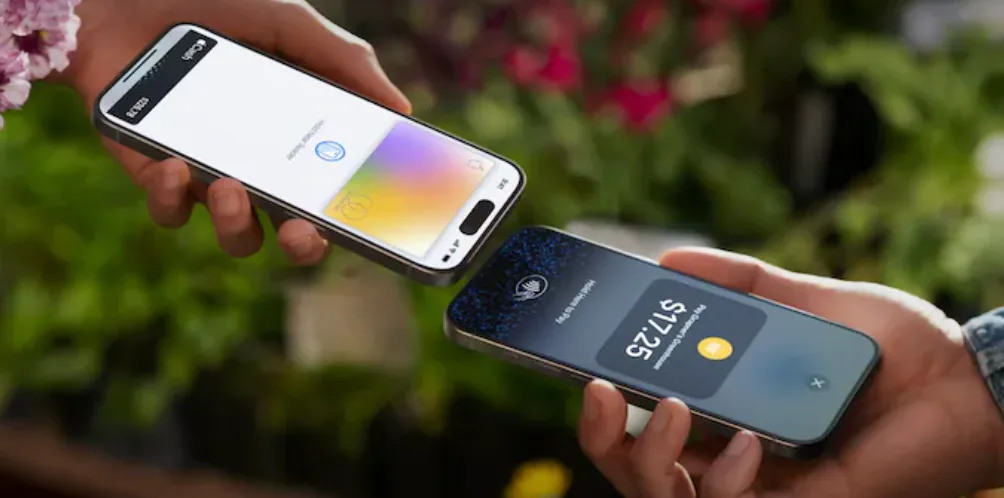
Apple Pay went live in India on Wednesday, 30 September 2026.
After roughly ten years of rumours, meetings with bankers, and reports that it was always one quarter away, you can now add a card to Apple Wallet in India and pay by holding your iPhone near a terminal.
There is a catch, and it is a big one. At launch, exactly one bank is on board.
So before you open the Wallet app and start tapping, here is what actually launched, how to set it up, where it works today, and why most Indian iPhone owners will have to wait a little longer.
What actually launched
Apple Pay in India currently supports Axis Bank credit cards on the Visa and Mastercard networks. That is the full list.
Here is what that leaves out:
- Other banks. HDFC Bank, ICICI Bank and SBI Card are not part of the launch. TechCrunch reported that talks with them over commercial terms are still going on.
- RuPay. India’s own card network is not supported, even on Axis cards.
- Debit cards. Only credit cards are supported for now.
- UPI. You cannot scan a UPI QR code with Apple Pay.
- Mac. Apple says Mac support is coming later, with no date announced.
What you do get works on iPhone, Apple Watch and iPad. You can pay at contactless terminals in shops, inside apps, and on websites that accept Apple Pay.
Two details from Apple’s announcement matter more than they look. First, you do not need to enter your card PIN or a one time password at checkout. Your iPhone or Watch confirms the payment with Face ID, Touch ID or your device passcode instead. Second, you keep earning the same rewards and benefits your Axis card already gives you. Paying through Apple Pay does not change how the bank treats the transaction.
Will your iPhone or Watch work
Probably yes, as long as your software is up to date.
Apple lists these requirements for India:
- iPhone XR or later, running iOS 18 or later
- Apple Watch Series 6 or later, running watchOS 11 or later
In simple terms, if your iPhone came out in 2018 or later and you have been installing updates, you are covered.
How to set up Apple Pay in India
There are two ways to add your Axis Bank card, and both take a couple of minutes.
Option 1: From the Axis Bank app
- Update the Axis Bank app to the latest version.
- Find the option to add your credit card to Apple Wallet.
- Follow the prompts. The bank will verify the card for you.
Option 2: From the Wallet app
- Open Wallet on your iPhone.
- Tap the plus button and choose to add a debit or credit card.
- Scan your card with the camera or type in the details.
- Complete the verification Axis Bank asks for.
To add the card to your Apple Watch, open the Watch app on your iPhone, go to Wallet and Apple Pay, and add the card there.
Paying in a shop: double click the side button on your iPhone, look at the phone for Face ID, and hold the top of the phone near the card machine. On an Apple Watch, double click the side button and hold the watch face near the machine.
Paying online: choose Apple Pay at checkout and confirm with Face ID or Touch ID. No redirect to a bank page, no waiting for an OTP.
Where you can actually use it
Apple says millions of merchants in India accept it at launch, and named a handful, including Apple Store locations, Blinkit, Chaayos, Croma, Ixigo, Reliance brands, Tata 1mg and Zomato.
That list is worth reading closely, because several of those names are apps, not shops. Blinkit, Zomato, Tata 1mg and Ixigo are places where people buy things on their phones every day. That is where Apple Pay makes the biggest difference in India, and I will come back to why.
In physical shops, expect things to be a little uneven for the first few weeks. Early reports say payment terminals need to support Apple Pay on their side, so a machine that accepts a contactless card may not accept your iPhone yet. If a payment fails, it is almost always the terminal rather than your phone. Keep your physical card handy until acceptance settles down.
Why only one bank
This is the most interesting part of the story.
Back in August, reports said Apple wanted to earn between 15 and 20 basis points on each transaction, taken from the fee banks already earn on card payments. Some banks were reportedly pushing for closer to 10. That fee does not come out of your pocket or the shop’s pocket. It comes out of the bank’s share.
Now look at who signed up. Axis Bank, which is the fourth largest credit card issuer in India, with more than 16 million active cards. The three biggest issuers, HDFC Bank, ICICI Bank and SBI Card, are not in, and the reported reason is that commercial terms are still being negotiated.
Put those two facts together and the picture is fairly clear. The fee disagreement that was reported in August has not been settled with the biggest banks. Apple chose to launch with one willing partner rather than wait for all of them.
That choice makes sense. Getting Apple Pay switched on in India at all was the hard part, involving regulators, card networks and data rules. Adding a second or third bank from here is a much smaller step. It just depends on the price.
For users, though, it means something simple. If your credit card is from HDFC, ICICI or SBI, which covers a very large share of India’s credit card holders, Apple Pay does nothing for you today.
Why UPI is still missing
UPI handles about 84 percent of digital transactions in India. It is how most people pay for almost everything, from a cup of chai to the monthly electricity bill.
Apple Pay does not connect to it. To add UPI, Apple needs approval from the National Payments Corporation of India, which runs UPI, and a sponsor bank to route those payments. Some reports before launch suggested UPI might arrive alongside cards. It did not.
So for daily small payments, nothing changes. You will still open PhonePe, Google Pay or Paytm to scan a QR code at the local shop.
Leaving out RuPay is related. RuPay is the network the government has pushed hardest, and RuPay credit cards are the ones that can be linked to UPI. Apple has launched entirely on the global networks, Visa and Mastercard, which is where card fees are highest and where its business model works best.
Who benefits right now
Axis Bank credit card holders with an iPhone. You can use it today, in shops and online.
People who shop online a lot. This is the real win in India, and it is easy to miss. Almost every online card payment here sends you to a bank page, asks for an OTP, and sometimes times out while you wait for the SMS. Apple Pay replaces that whole routine with one glance at your phone. For anyone who orders food or groceries several times a week, that is a genuine daily improvement.
Apple Watch owners. Until now, the Watch could not pay for anything in India. It can now, as long as the card is from Axis.
Everyone else. Nothing yet. That will change when the next big bank signs on.
What this launch tells us
Apple has been growing quickly in India. Counterpoint Research expects Apple’s share of smartphone shipments in the country to reach around 10 percent this year, helped by strong demand for the iPhone 18 Pro and Pro Max. Estimates put the number of iPhone owners in India somewhere between 35 and 45 million.
That is a small slice of the whole market, but it is the slice that spends the most. Those buyers are also the people most likely to hold premium credit cards and pay for things online. Apple Pay’s launch is aimed squarely at them.
The thing to watch now is which bank comes second. When HDFC or ICICI signs, Apple Pay goes from a useful extra for Axis customers to something most premium card holders in India can actually use. UPI is the longer game, and it depends on regulators rather than bank negotiations.
The bottom line
Apple Pay is finally live in India, and it works well for the people it covers. The biggest benefit is not tapping at a shop counter. It is skipping the OTP page every time you pay online.
But the launch is narrow. One bank, credit cards only, no RuPay, no UPI, no Mac. The missing banks appear to be a pricing problem, and pricing problems tend to get solved once one side sees the other making money.
For now, if you have an Axis credit card, set it up today. If you do not, check back when the next bank announcement lands.
Next steps worth taking
If you have an Axis Bank Visa or Mastercard credit card: add it through the Axis app or Wallet, set it as your default card, and try a small online order first to see the checkout in action.
If your card is from another bank: there is nothing to do yet. Do not apply for a new Axis card just to use Apple Pay unless that card makes sense for you on its own.
If you own an Apple Watch: add the card to the Watch as well. It is the most convenient way to tap at a counter.
If you run a business: ask your payment provider whether your card machines and online checkout accept Apple Pay. If they already accept contactless cards, it may only need to be switched on.
Keep your physical card with you for the next few weeks. Some terminals will not accept Apple Pay yet, and a declined tap at the counter is easier to handle with a backup.
Leave a Reply