
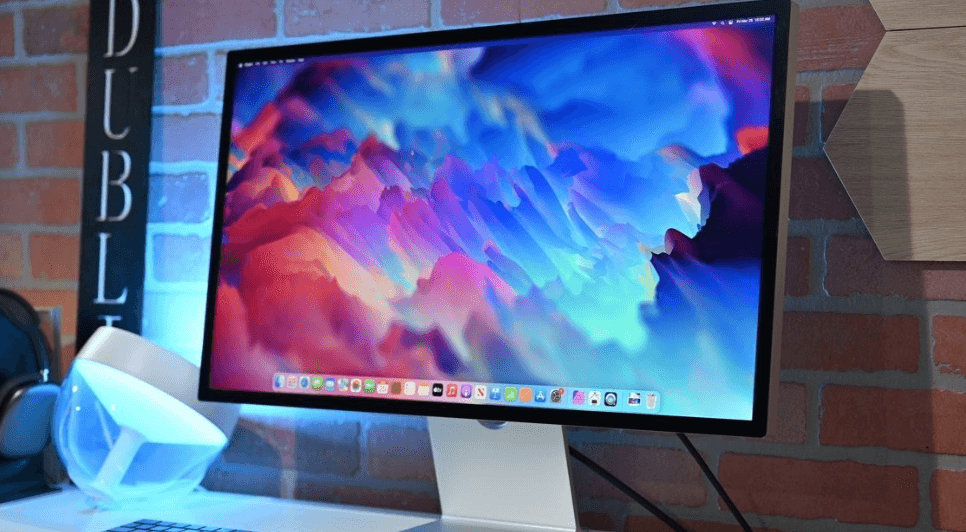
I’ll admit it when Apple launched the original Studio Display back in March 2022, I was excited. A gorgeous 5K display with excellent speakers, a decent webcam, and that unmistakable Apple design language? Sign me up. But here’s the thing: nearly four years later, that display is starting to feel… dated. The 60Hz refresh rate? Kinda sluggish. No HDR support? That stings when you’re editing photos or watching content. And don’t even get me started on that A13 chip from 2019.
Well, folks, it looks like Apple heard our complaints. Because if the rumors are true and trust me, they’re looking pretty solid we’re about to get a Studio Display that’s worth getting genuinely excited about. We’re talking 120Hz ProMotion, mini-LED HDR, a brand-new A19 Pro chip, and possibly more. Spring 2026 can’t come fast enough.
When Can We Actually Buy This Thing?
Let’s start with the most important question: when? Based on regulatory filings that just surfaced in China (model number A3350, if you’re keeping track), combined with code findings from iOS 26 beta builds, we’re looking at a spring 2026 launch. More specifically, think March or April.
Why that timing? Apple typically refreshes its Mac lineup in the spring, and the Studio Display 2 is expected to launch right alongside the new M5 Mac Studio and possibly updated Mac mini models. It’s the same playbook they used in 2022 when the original Studio Display debuted with the first Mac Studio.
A recent regulatory filing appeared just three days ago, and if history repeats itself (the original Studio Display showed up in the same database about three months before launch), we could be looking at an announcement sometime between late March and early April. That’s close enough that I’m already thinking about where I’d put a second display on my desk.
The Screen That Finally Gets It Right
Alright, here’s where things get interesting. The new Studio Display is keeping the same 27-inch size and 5K resolution (5120 × 2880 pixels, for those counting), which honestly makes sense it’s already a gorgeous resolution at 218 pixels per inch. But that’s where the similarities with the current model end.
The biggest upgrade? 120Hz ProMotion. Let me tell you why this matters. If you’ve ever used a MacBook Pro with ProMotion and then gone back to a 60Hz display, you know exactly what I’m talking about. Everything feels smoother scrolling through websites, moving windows around, even just dragging your cursor across the screen. It’s one of those things where once you experience it, 60Hz feels almost choppy by comparison.
ProMotion isn’t just about a fixed 120Hz refresh rate, either. It’s variable, meaning the display can dynamically adjust between different refresh rates depending on what you’re doing. Reading a static document? It might drop to 60Hz to save power. Scrolling through a webpage? Boom, 120Hz kicks in for buttery-smooth motion. Gaming or editing video? You’re getting that full 120Hz experience.
But wait there’s more. The display is also getting HDR support for the first time, powered by mini-LED backlighting technology. This is the same technology Apple uses in its high-end MacBook Pro models, and the difference is genuinely night and day compared to standard LCD panels.
What does this mean in practical terms? The current Studio Display maxes out at 600 nits of brightness and doesn’t support HDR at all. The new model is expected to hit 1,000 nits sustained brightness for SDR content, with peaks up to 1,600 nits for HDR content. That’s more than double the brightness of the current display, with vastly superior contrast and color accuracy thanks to the thousands of individual dimming zones mini-LED enables.
Picture this: you’re editing photos of a sunset, and you can actually see the full dynamic range from the deepest shadows to the brightest highlights. Or you’re watching a movie, and dark scenes actually look dark instead of that washed-out gray you get with traditional backlit displays. That’s what mini-LED brings to the table.
A19 Pro: Serious Power for a “Simple” Monitor
Now, you might be wondering: why does a monitor need a chip at all, let alone one as powerful as the A19 Pro? Great question. The current Studio Display uses the A13 Bionic chip (the same one from the iPhone 11 back in 2019) to handle things like the webcam’s Center Stage feature, spatial audio processing, and “Hey Siri” functionality.
The Studio Display 2 is jumping six generations ahead to the A19 Pro the same chip that just debuted in the iPhone 17 Pro and iPhone 17 Pro Max. That’s a massive leap in computational power, and it opens up some fascinating possibilities.
For starters, the improved processing power means better Center Stage performance. If you’ve used the webcam on the current Studio Display, you know it’s decent but not amazing. The A19 Pro should deliver significantly improved image processing, better low-light performance, and more accurate tracking as you move around during video calls.
Then there’s spatial audio. The current Studio Display already has an impressive six-speaker system with force-canceling woofers, but the A19 Pro enables even more sophisticated audio processing. We’re talking about sound that adapts more intelligently to your environment, better Dolby Atmos support, and potentially new features we haven’t even heard about yet.
But here’s what really gets me excited: what else could Apple do with all that processing power? Could the display handle some computational photography features? Could it offload certain tasks from your Mac to improve overall system performance? Could we see features we haven’t even imagined yet? That’s the kind of forward-thinking that makes Apple products so compelling.
The Design: If It Ain’t Broke…
Based on everything we’ve heard, the physical design of the Studio Display 2 should remain largely unchanged. That’s not necessarily a bad thing the current design is sleek, minimal, and fits perfectly with the aesthetic of modern Macs.
We’re still looking at that beautiful aluminum enclosure, the same mounting options (tilt-adjustable stand, tilt-and-height-adjustable stand, or VESA mount), and the same port configuration on the back: one Thunderbolt port for your Mac connection and power delivery (up to 96W for charging your MacBook), plus three USB-C ports for peripherals.
The optional nano-texture glass finish should also make a return. If you’ve never seen this in person, it’s genuinely impressive it virtually eliminates glare while maintaining excellent image quality. For anyone working in a bright environment or near windows, it’s worth the extra cost.
One thing that might change? The webcam. While nothing’s confirmed, there’s been talk of Apple upgrading to a newer camera module with better specs. The current 12-megapixel Ultra Wide camera is fine, but it’s not exactly the best webcam experience out there. An upgrade would be welcome.
Connectivity and Compatibility
Let’s talk ports. The current Studio Display has one Thunderbolt 3 port and three downstream USB-C ports running at 10Gbps. There’s been some speculation that the new model might upgrade to Thunderbolt 4 or even Thunderbolt 5, but nothing’s confirmed yet.
What we do know is that the display will be compatible with the same range of Macs as the current model basically any Mac with Thunderbolt support from the last several years. And before you ask: yes, it works with Windows PCs too, though you’ll need to install some drivers to get full functionality (speakers, camera, brightness control, etc.). Some users have reported success using specific USB-C to DisplayPort cables with extra USB-A connections to power all the features.
The Price Question Everyone’s Asking
Okay, deep breath. Let’s talk money. The current Studio Display starts at $1,599 with the basic tilt-adjustable stand, goes up to $1,999 with the height-adjustable stand, and can hit over $2,000 if you add the nano-texture glass option.
With these substantial upgrades 120Hz ProMotion, mini-LED HDR, A19 Pro chip there’s basically no way Apple keeps the price the same. Industry analysts are suggesting we’re looking at a starting price somewhere between $1,800 and $2,000, potentially higher for the fully-loaded model with height adjustment and nano-texture.
Is that expensive? Absolutely. Is it worth it? That depends entirely on your use case and budget. If you’re a creative professional who spends 8+ hours a day staring at a screen, working with HDR content, or doing color-critical work, the improved image quality and smoothness could absolutely justify the cost. For casual users who just want a nice-looking display for basic tasks, it might be overkill.
Here’s how I think about it: the current Studio Display has been out for almost four years, and people are still buying it at full price because it’s an excellent overall package. The Studio Display 2, with these upgrades, should be an even more compelling option that you’ll use for the next 5-7 years. Spread that cost over time, and suddenly it doesn’t seem quite as painful.
How It Compares to the Competition
Let’s be real for a second: Apple isn’t the only game in town when it comes to high-quality displays. Companies like LG, Dell, BenQ, and Samsung all make excellent monitors, many of which offer 4K or even 5K resolution, high refresh rates, and HDR support often for less money than Apple’s asking.
So why would you choose the Studio Display 2? Integration, mainly. If you’re deep in the Apple ecosystem with a Mac Studio, MacBook Pro, or Mac mini, the Studio Display 2 is designed to work seamlessly with your setup. One cable for everything (power, display, data), excellent color accuracy that matches your MacBook’s display, and features like AirPlay and Siri that just work.
Plus, let’s not forget about build quality. Apple displays are built like tanks. My 2011 Cinema Display is still going strong after all these years. These things last forever if you take care of them.
That said, if you’re on a tighter budget or you use both Mac and Windows machines regularly, there are definitely other options worth considering. The LG UltraFine 5K, Dell UltraSharp displays, and various BenQ models all offer compelling feature sets at different price points.
What About the Pro Display XDR?
Quick sidebar: you might be wondering what this means for Apple’s ultra-premium Pro Display XDR, which starts at $4,999 (yes, you read that right, and the stand is another $999).
According to recent reports, a second-generation Pro Display XDR is also in development, but it’s “less of a priority” for Apple right now. That makes sense the Pro Display XDR serves an extremely niche market of high-end professionals who need 6K resolution and extreme color accuracy. The Studio Display, on the other hand, targets a much broader audience of creative professionals and enthusiasts.
When the Pro Display XDR 2 eventually arrives (probably not until 2027 or later), it’s rumored to feature quantum-dot display technology for even better color reproduction and potentially OLED or micro-LED technology. But that’s a story for another day.
Real-World Impact: Who Should Care?
Let’s get practical. Who’s going to benefit most from these Studio Display 2 upgrades?
Video editors and colorists will love the mini-LED HDR support. Finally being able to see your HDR content accurately without spending $5,000 on a Pro Display XDR is huge. The 120Hz refresh rate also makes scrubbing through timelines significantly smoother.
Photographers working with high-dynamic-range images will appreciate the increased brightness and contrast. You’ll be able to see more detail in both shadows and highlights, making your editing work more accurate.
Developers and designers who spend all day staring at code or design mockups will love the 120Hz ProMotion. Once you get used to smooth scrolling, going back to 60Hz feels like punishment.
Content creators doing video calls or streaming will benefit from the improved Center Stage webcam performance powered by the A19 Pro chip. Better image processing means you’ll look better on camera.
General users who just want the best possible Mac display experience will appreciate all of the above, plus the future-proofing that comes with getting cutting-edge display technology.
The “Should I Wait?” Question
Here’s where it gets tricky. If you need a display right now, the current Studio Display is still an excellent choice—it’s not like it suddenly became a bad product just because a new one is coming. You can often find deals on the current model, and it’ll serve you well for years to come.
But if you can possibly wait until spring 2026, I’d strongly recommend holding off. The jump from 60Hz to 120Hz, combined with HDR support, represents such a significant upgrade that it’s worth the patience. This isn’t just an incremental refresh it’s a genuine leap forward in display technology.
Think about it this way: would you rather save a few hundred dollars now and kick yourself for the next five years every time you notice the lack of HDR or feel the sluggishness of 60Hz? Or would you rather wait a few more months and get the display that’s actually going to feel cutting-edge for years to come?
What We Still Don’t Know
Despite all the leaks and rumors, there are still some question marks hanging over the Studio Display 2. Here’s what I’m still curious about:
Screen sizes: Will Apple offer a 32-inch option? Multiple forum discussions and user requests suggest there’s serious demand for a larger size that doesn’t cost $5,000 like the Pro Display XDR. A 32-inch Studio Display 2 would fill a perfect gap in Apple’s lineup.
OLED vs mini-LED: While all signs point to mini-LED, some people have wondered why Apple isn’t going with OLED, especially given that the iPad Pro and iPhone use OLED panels. The answer probably comes down to cost, longevity concerns with OLED burn-in, and the fact that mini-LED is already proven in Apple’s MacBook Pro line.
Thunderbolt 5: Will the display upgrade to the latest Thunderbolt standard for even faster data transfer and more power delivery? We don’t know yet.
New features: What else might the A19 Pro chip enable? Could we see Face ID support? Enhanced Continuity features? Better device handoff? Apple loves to surprise us with “one more thing” features.
The Bigger Picture: Apple’s Display Strategy
Stepping back for a moment, the Studio Display 2 represents something bigger than just a monitor refresh. It shows Apple’s renewed commitment to the desktop Mac experience and professional users.
For years, Apple’s display lineup felt neglected. The Pro Display XDR was too expensive for most people, and the Studio Display was the only “mainstream” option (if you can call $1,599 mainstream). By investing in a significant update to the Studio Display, Apple is signaling that they understand desktop displays matter to their users.
This also fits into Apple’s broader strategy of creating a seamless ecosystem. When your MacBook Pro, your Studio Display, your iPad, and your iPhone all have similar display technology (ProMotion, HDR, wide color gamut), it makes the entire experience feel cohesive. You’re not adjusting to different refresh rates or color profiles as you move between devices.
My Take: Is This the Monitor We’ve Been Waiting For?
Look, I try to stay measured in my enthusiasm for new tech. I’ve been burned before by products that sounded amazing on paper but disappointed in reality. But everything I’m seeing about the Studio Display 2 suggests Apple is taking this seriously.
The combination of 120Hz ProMotion, mini-LED HDR, and a powerful A19 Pro chip addresses every major complaint people had about the original Studio Display. This isn’t Apple just checking boxes—they’re actually pushing forward with display technology that will make a real difference in daily use.
Will it be expensive? Yes. Will some people think it’s overkill? Absolutely. But for those of us who spend significant time in front of our displays, who care about image quality, and who want a monitor that will still feel premium five years from now, the Studio Display 2 is shaping up to be exactly what we’ve been asking for.
The fact that we’re seeing regulatory filings and code references means this is real it’s happening. Apple isn’t going to launch this thing and then forget about it for another four years (I hope). This feels like the beginning of a new chapter for Apple’s display lineup.
The Bottom Line
Spring 2026 is right around the corner, and if these rumors pan out, we’re in for one of the most significant display launches Apple has done in years. The Studio Display 2 won’t be cheap, but it promises to deliver a viewing experience that’s worth every penny for people who care about display quality.
For me, the question isn’t whether I’ll buy one it’s whether I’ll be able to talk myself into keeping my current display or if I’ll end up with a dual-monitor setup. (Spoiler: it’s probably going to be the latter.)
The original Studio Display was good. The Studio Display 2 looks like it’s going to be great. And honestly? It’s about time Apple gave us a desktop display worth getting excited about.
Now if you’ll excuse me, I’m going to go stare at my current 60Hz display and start counting down the days until spring.
Leave a Reply